Radiology Vocabulary 101: What is a PACS?


Sparkly Cat Ears?
As you stroll through the convention hall, a guy at a nearby booth lures you in with a chance to win a free pair of sparkly cat ears. You’re a sucker for sparkly cat ears, so you play the game. He starts asking what PACS your veterinary hospital uses and where it’s located. You know that a PACS has something to do with radiology but you’re not really sure exactly what it is, so you reply with the answer that’s usually safe: “Uhhh… IDEXX I think?”
“Oh yeah, but is it in the cloud or on prem?”, he asks.
You mumble something, act like your phone is ringing, and forget the cat ears as you quickly walk away from the booth.
We learn a lot in vet school, but we don’t learn everything. Navigating the various types of hospital and equipment software, vendors, possible architectures, and all of the associated terminology is something we may not learn until years into our career. And by that point we may be too nervous to actually admit we don’t understand and fail to ask the questions for fear of looking dumb.
In this series we’ll help veterinarians understand some of the confusing terminology used in the world of radiology. In this post, we start with the term “PACS”.
What is a PACS?
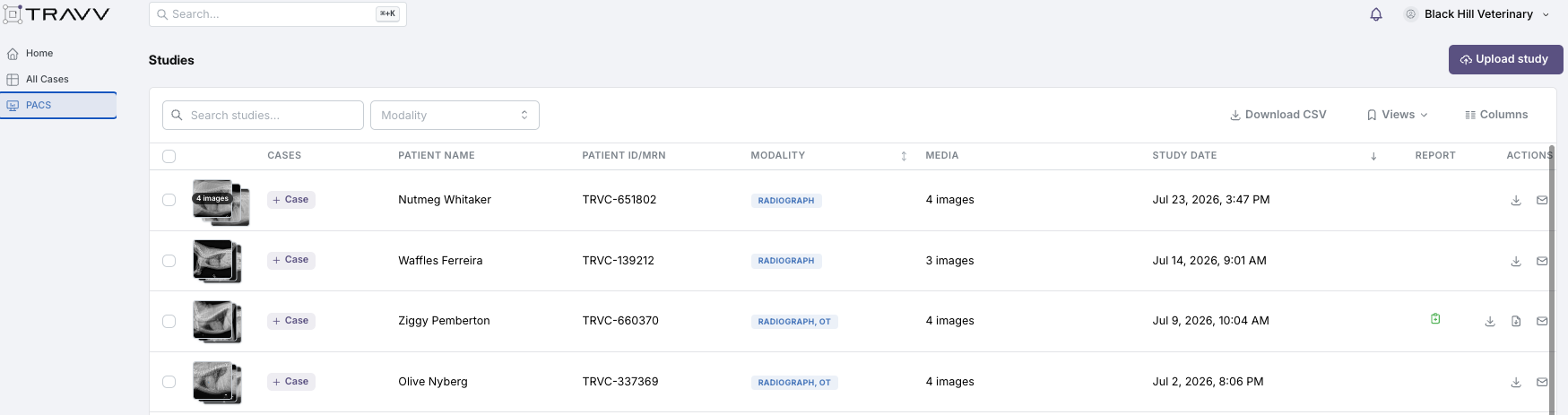
PACS stands for Picture Archiving and Communication System. It’s the digital filing cabinet and mailroom for every radiograph, ultrasound, and CT image your hospital produces. Back in the 1900s (as the kids of today like to say), before radiology was digital, images lived on physical film and were stored in folders. If you wanted radiologist review, the folder would be sent or mailed physically. All of that storage and delivery is now handled by software that we call “PACS”. Your PACS stores your images in a standardized format so that images from a study are kept together, displayed in a viewer, and shared with a colleague or radiologist. It would be a nightmare if your individual images from all studies had to be manually saved in folders, or if they were all thrown together in one mega folder. It’s the job of the PACS to organize and store them for you. The viewer itself is technically not part of the PACS; it just displays the images stored by the PACS. But sometimes people think about the viewer as being part of the PACS since they work closely together.
Where is the PACS located?
- On-premise (“on prem”) means the PACS runs on a server physically in your hospital. It may be on the computer in your dark room or in a server somewhere else in your building, but it’s local.
- Cloud means the PACS lives on servers managed by a vendor off-site and you reach it over the internet. There’s no physical box to maintain. Your images are backed up off site automatically.
When radiology went digital everyone started with on-premise PACS, which makes complete sense when you remember how bad the internet was in the late 90s and early 2000s. Trying to upload images or retrieve them would have been a nightmare for many hospitals.
But then bandwidth and infrastructure improved and cloud storage became not only fast but affordable.
Radiology has been steadily moving to the cloud for the same reason other industries have: easier access to images from anywhere, secure and immediate backup storage, and less to maintain.
Why does the PACS matter to a veterinarian?
The PACS is the hub for your hospital’s imaging workflow. Where it lives not only affects your hospital economically, but also determines how secure your storage is and where images can be accessed from. These images are part of the medical record. Computers crash, hard drives fill up, and data gets lost. The trend toward cloud PACS is a logical one as veterinarians seek more secure, accessible, and modern ways of interacting with their data.
Travv PACS is a cloud PACS that enables affordable, immediate, and secure storage of your radiology images with the ability to access them remotely from any device on any browser. We’ve walked into so many hospitals that can only view their radiographs on one or two computers in the hospital, with hard drives maxing out on storage and requiring monthly tech time transferring data and purging to free up space. In a quick onboarding session, Travv PACS changes all of that for a hospital and immediately frees up tech time.
How does Travv PACS improve the hospital radiology workflow?
Once your imaging equipment is routed to Travv PACS, you no longer have to mess with backing up your images or transferring them to other computers. After capture, images are immediately viewable in the cloud from any device, anywhere. Your data is securely stored and safe from disaster.
Beyond the convenience and efficiency of cloud storage, this workflow also allows Travv to analyze images using AI before you ever open them, unlocking opportunities for automated analysis and annotation such as VHS and VLAS measurements, pre-surgical planning annotations, and more. Automated tools aren’t helpful if you’re forced to export images to third party platforms that add friction to your day.
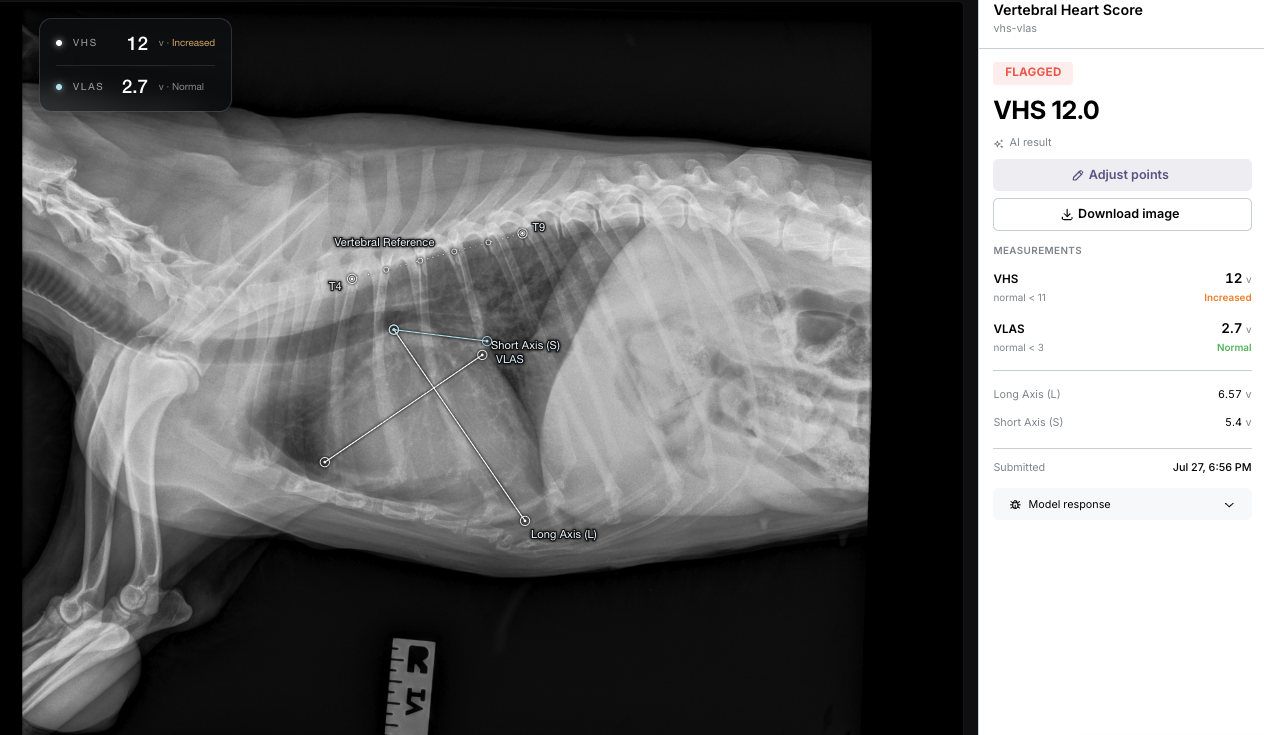
Travv PACS also comes with a snappy user interface that allows hospitals to rapidly write their own reports, jot down notes, and send off consults to Travv’s radiology team. Often a PACS is just for storage, but Travv has integrated everything so that you have one platform that connects your storage, consults, notes, and other diagnostics.
Ready to give Travv a test drive?
Understanding what the system is and how good it can be with today’s technology is the first step to recognizing what’s holding your hospital back. Hopefully this has been a helpful step in better understanding PACS options in veterinary medicine.
And the next time someone at a booth asks you whether your PACS is in the cloud or on-prem, you’ll know exactly what they mean… and get to keep the cat ears.
If you’d like to learn more about Travv’s cloud PACS, reach out and let us help you design a better system for your hospital!